Hello PIVX Community,
Two day ago I started getting the following message:
Warming
Peers are being disconnected due time differences. (see attachment)
I am running Raspberry Pi OS 64Bits.
last edited 04/24/24 by lotar
Hello PIVX Community,
Two day ago I started getting the following message:
Warming
Peers are being disconnected due time differences. (see attachment)
I am running Raspberry Pi OS 64Bits.
Is your rpi time synced? You are having a local issue
This is what I get after executing timedatectl
System clock synchronized: yes
              NTP service: active
I am new with Linux sync
I just downloaded a fresh snapshot file of the PIVX blockchain and see if that fixes the issue.
In case it does not, I will do a fresh install of my RaspiOs and if that does not fix the issue either, I will try with a Win11 machine and let you know.
Let's hope for the best because I really want to have my third MasterNode up and running. (Currently I have two of them)
By the way, with timedatectl timesync-status I get
Server: 132.163.96.2 (time.nist.gov)
Poll interval: 34min 8s (min: 32s; max 34min 8s)
         Leap: normal
      Version: 3
      Stratum: 1
    Reference: NIST
    Precision: 1us (-29)
Root distance: 610us (max: 5s)
       Offset: +3.471ms
        Delay: 47.639ms
       Jitter: 16.339ms
 Packet count: 10
    Frequency: -17.313ppm
Does the above output look ok?
P.S. I also have some PNY Masternodes and I am not having any sync issues.
Did the snapshot help?
No, it did not.
I have also reset my router and reinstalled RaspiOS but still, the problem persists.
In addition to this, I also forced time sync every 30 minutes with sudo ntpd -gq but that did not fix the problem either.
I just deleted the PIVX folder with the exception of my wallet.dat and the masternode.conf.... Let's see if this fix the issue.
To be honest, I start running out of ideas.
If you run
timedatectl status
, what do you get? All times should match.
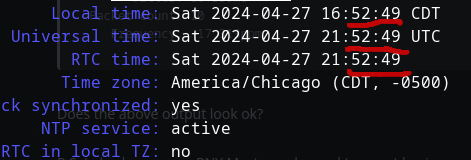
@lotar please try the following
sudo timedatectl set-ntp true
then restart the service
sudo systemctl restart systemd-timesyncd
@palmtree:
If you runTXTtimedatectl status, what do you get? All times should match.
Hello Palmtree
This is what I get after executing
timedatectl status
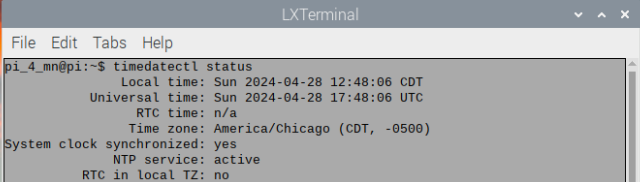
As a last resort I bought a Real Time Clock Module RTC; it should arrive Saturday May 4th.
I will keep you posted.
By the way, is it normal that my two PIVX MasterNodes have different BLOCK-HEIGHT?
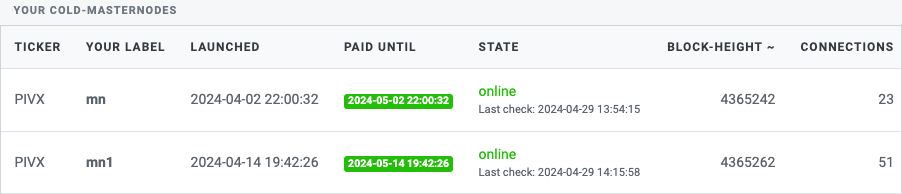
P.S. To make sure there is nothing wrong with the server where my two MasterNodes are hosted, I am running my PIVX wallet on a win10 machine using a software called NetTime; let's see if I still have time difference issues.
@lotar:
As a last resort I bought a Real Time Clock Module RTC; it should arrive Saturday May 4th.I will keep you posted.
By the way, is it normal that my two PIVX MasterNodes have different BLOCK-HEIGHT?
P.S. To make sure there is nothing wrong with the server where my two MasterNodes are hosted, I am running my PIVX wallet on a win10 machine using a software called NetTime; let's see if I still have time difference issues.
Hmm, the block height should be the same maybe at worst off by one. I would check to see if you are forked. https://toolbox.pivx.org/forked
Current number of blocks: 4365658
Last Block Hash: 78b2721dafe5f4ac836b9831f5968af6e14ce4a64f360493410603cad96963ef
I get: You are on the correct chain
So, from their side, is everything ok?
@lotar:
Current number of blocks: 4365658
Last Block Hash: 78b2721dafe5f4ac836b9831f5968af6e14ce4a64f360493410603cad96963efI get: You are on the correct chain
So, from their side, is everything ok?
did you do it for both?
Silly question... How do I get the Current number of blocks and the Last Block Hash from both MasterNodes?
Sorry but I am learning on the fly.
typically each mn is hosted on a seperate vps or server, the command to check the block status needs to be run on each server, usually via a command line command.
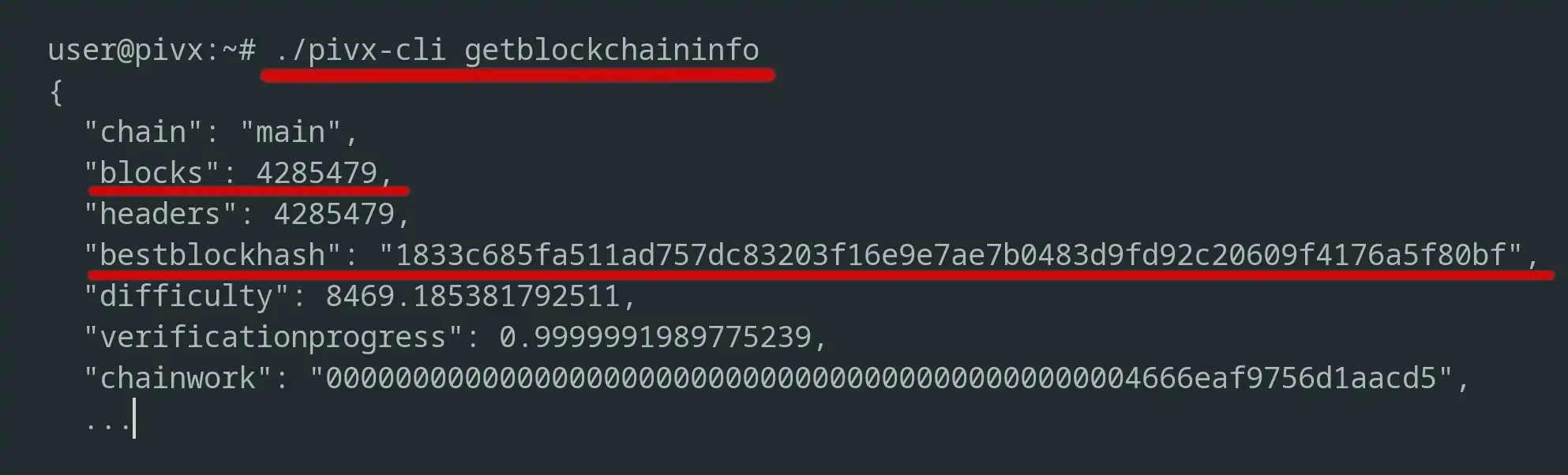
@lotar:
This is what I got after executing getblockchaininfoJSON{ "chain": "main", "blocks": 4366643, "headers": 4366643, "bestblockhash": "2c95f298fa1e8e560e591589fdf7794e68439a764ecec858ffb8b3d5a611e522", "difficulty": 10233.65617941118, "verificationprogress": 0.999999891955209, "chainwork": "0000000000000000000000000000000000000000000000468ee4c7131ac16f9e", "shield_pool_value": { "chainValue": 766569.12239412, "valueDelta": 0.00000000 }, "initial_block_downloading": false, "softforks": [ { "id": "bip65", "version": 5, "reject": { "status": true } } ], "upgrades": { "PoS": { "activationheight": 259201, "status": "active", "info": "Proof of Stake Consensus activation" }, "PoS v2": { "activationheight": 615800, "status": "active", "info": "New selection for stake modifier" }, "Zerocoin": { "activationheight": 863787, "status": "active", "info": "ZeroCoin protocol activation - start block v4" }, "Zerocoin v2": { "activationheight": 1153160, "status": "active", "info": "New zerocoin serials and zPOS start" }, "BIP65": { "activationheight": 1808634, "status": "active", "info": "CLTV (BIP65) activation - start block v5" }, "Zerocoin Public": { "activationheight": 1880000, "status": "active", "info": "Activation of zerocoin public spends (spend v3)" }, "PIVX v3.4": { "activationheight": 1967000, "status": "active", "info": "New 256-bit stake modifier - start block v6" }, "PIVX v4.0": { "activationheight": 2153200, "status": "active", "info": "New message sigs - start block v7 - time protocol - zc spend v4" }, "v5 shield": { "activationheight": 2700500, "status": "active", "info": "Sapling Shield - start block v8 - start transaction v3" }, "PIVX v5.2": { "activationheight": 2927000, "status": "active", "info": "New cold-staking rules" }, "PIVX v5.3": { "activationheight": 3014000, "status": "active", "info": "New staking rules" }, "PIVX v5.5": { "activationheight": 3715200, "status": "active", "info": "New rewards structure" }, "PIVX v5.6": { "activationheight": 4281680, "status": "active", "info": "Exchange address" } }, "warnings": "" }Does it look ok?
That one looks good, what about for the second MN?
I do not have access to them directly. I guess I have to contact my VPS provider.
Anyway, as I am waiting for my RTC module for my Raspberry Pi 4, I am running my PIVX wallet on a Windows 10 machine and so far... No issues and it has been up and running for more than 17 hours.
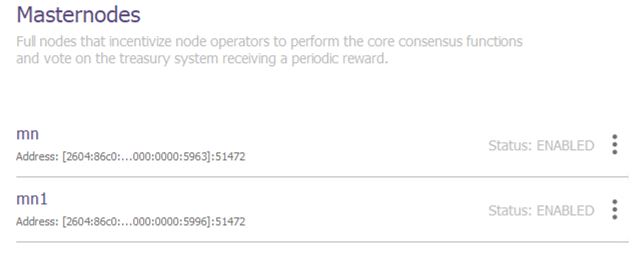
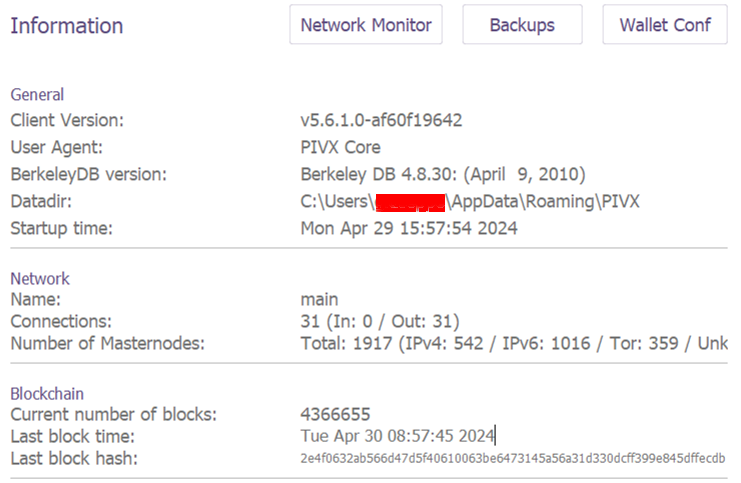
So, if the Windows machine has no issues with "Peers are being disconnected due time differences.", is there a chance that there might be a possible issue with the Raspberry PI version of the PIVX wallet?
P.S. The reason I want to use my Raspberry PI over a regular PC is the power consumption; PI 4 uses barely between 3 to 5 W.
if your still getting rewards for both nodes about every day, then those are fine so no need to worry.
The pi version should also be fine, many people use it without issue.
If you join the PIVX Discord, there's many more eyes on the posts along with some developers and your issues would most likely get resolved much faster. Very few people use the forum.
It seems to work under Win 10. I just got my first reward from one of my MasterNodes.
@palmtree:
if your still getting rewards for both nodes about every day, then those are fine so no need to worry.The pi version should also be fine, many people use it without issue.
If you join the PIVX Discord, there's many more eyes on the posts along with some developers and your issues would most likely get resolved much faster. Very few people use the forum.
I tried to join the PIVX discord but I get "The Invite Link is invalid or has expired"
Log in to reply.
| Topic | Participants | Replies | Views | Activity |
|---|---|---|---|---|
| 11 | 7765 | 2 years ago | ||
| 1 | 134877 | 2 years ago | ||
| 3 | 3393 | 2 years ago | ||
| 1 | 2969 | 2 years ago | ||
| 1 | 2529 | 2 years ago |