How to resync PIVX wallet from scratch - QT - GUI

Guide

Started by Jeffrey 6 years ago · 1 replies · 8119 views
6 years ago

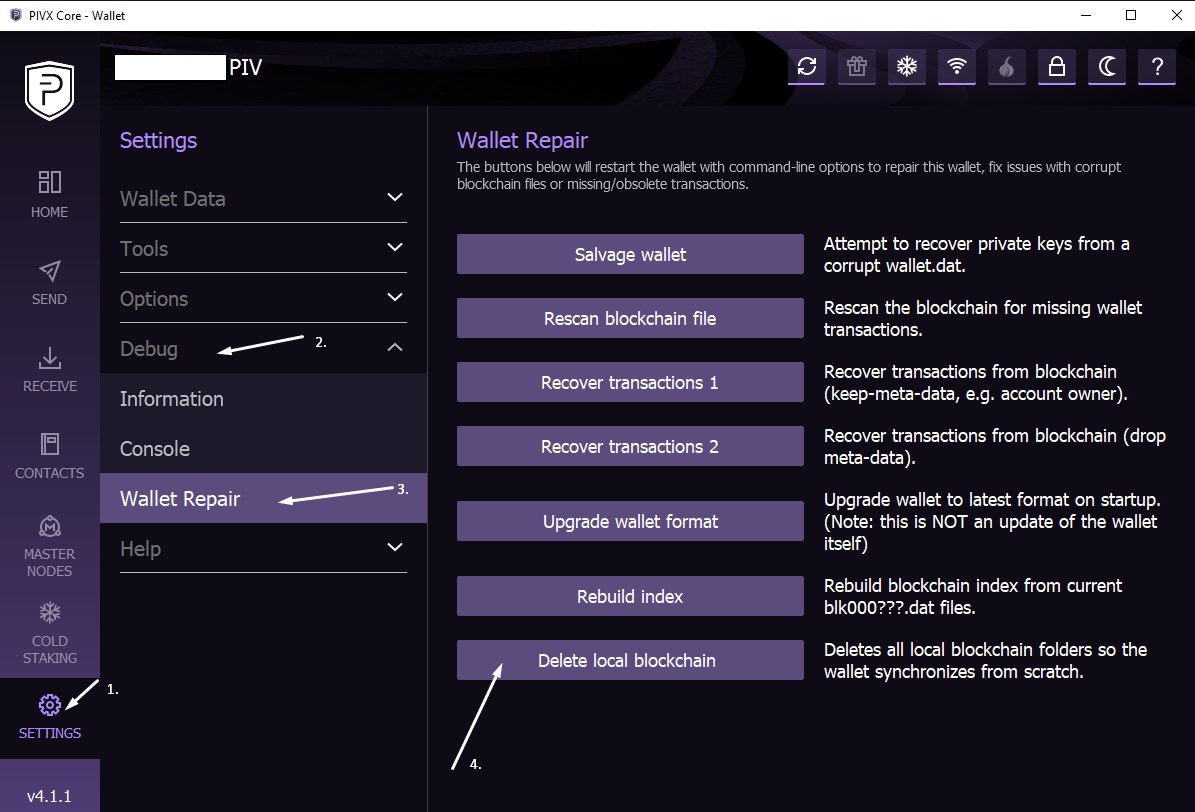
This is a simple guide on how to resync your wallet from scratch using the GUI (Graphical User Interface) of the PIVX wallet. This may be useful in a scenario that you updated to a mandatory update too late and ended up on a forked chain.
Screenshot_9.png

Firstly open your PIVX-QT wallet and wait for it to open.

1.) Select Settings
2.) Select "Debug"
3.) Select "Wallet Repair"
4.) Lastly select "Delete local Blockchain"

Your wallet will now restart and resync from scratch.

👍 2

Suggested topics

Topic Participants Replies Views Activity
Guides · by asadr, 2 years ago
0 3591 2 years ago
Guides · by hamidfatehi, 2 years ago
2 2742 2 years ago
Guides · by Jeffrey, 6 years ago
6 12983 3 years ago
Guides · by Liquid369, 6 years ago
1 6811 4 years ago
Guides · by Jeffrey, 6 years ago
5 9223 4 years ago